HalesMeds
- 3.3
- Rating
- 10.00K
- Installs
- Free
- Price

 Analysis by App-foxy
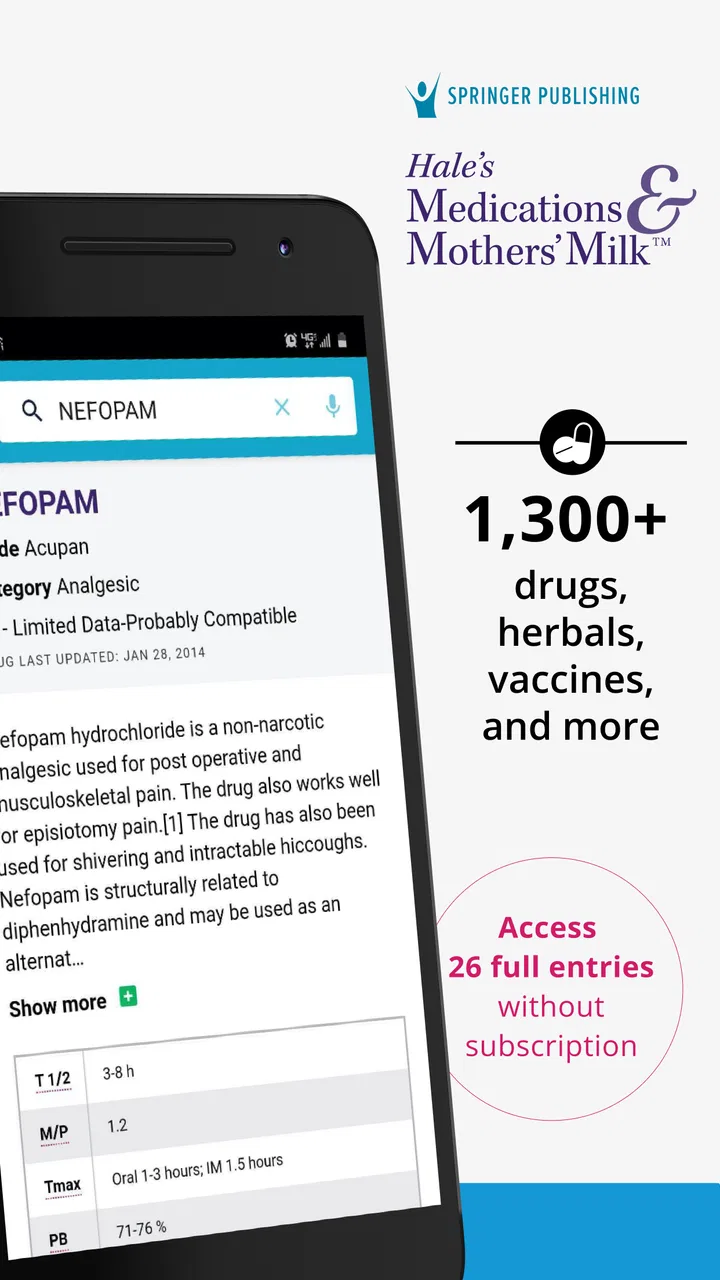
I approached HalesMeds as a practical medical reference rather than something meant to replace a clinician. Developed by Higher Learning Technologies Inc, this free app gathers evidence-based information about more than 1,300 drugs, diseases, vaccines, and syndromes. That focus makes it useful when I need a clear starting point quickly, especially while studying, preparing for a conversation with a healthcare professional, or checking an unfamiliar medical term.
My overall impression is mixed but positive. The app has a focused purpose and a useful breadth of subjects, yet it feels more like a reference shelf than a complete personal health companion. Its average rating is 3.3 from 28 ratings, with 8 written reviews, and that modest reception is a useful reminder to approach it for information lookup rather than expecting a polished all-in-one medical service. It is free to install, although in-app purchases range from $9.99 to $94.99 per item, so I would inspect what is available before committing to any paid material.
Using HalesMeds as a dependable reference habit
I use HalesMeds most confidently when I treat it as a reference I can return to, not as a one-time answer machine. In this section, I’ll focus on building a steady habit around a specific question, then on what to check when the app or the search process feels less straightforward. That distinction helps keep useful reading separate from decisions that need a healthcare professional.
You May Also Like

 Blood Strike: 2.5 Anniversary
Blood Strike’s Loadouts Turn Every Drop Into a Tactical Gamble
A close look at Blood Strike’s custom loadouts: how fast access to signature weapons reshapes its battle royale rhythm, rewards preparation, and narrows the gap between fights.

 Pandora - Music & Podcasts
Pandora’s Music Is Easy to Start, but Harder to Recover
Pandora’s strength is its low-effort path from a seed to a station. Its weak spot is how much confidence it asks you to place in connection, setup, and quiet recovery.

 8 Ball Pool
 Is Built on Rivalries, Rematches, and Routine
A close look at the rivalries, rematches, shared routines, and unanswered safety questions that turn a quick pool match into a persistent mobile community.

 Samsung Music
’s Quiet Strength Is Playing What You Already Own
Its reach comes less from spectacle than from dependable access to a personal library. That simplicity is both the app’s strongest retention engine and its ceiling.

 AccuWeather: Weather Radar
AccuWeather Review: A Quick, Clear Forecast for Everyday Decisions
For everyday plans, the best forecast is the one you can understand quickly. AccuWeather makes rain timing, radar, and local conditions easy to act on, with a few trade-offs.

 Hill Climb Racing
Why Hill Climb Racing Still Turns Crashes Into One More Run
A tiny car, a bumpy hill and one more upgrade: Hill Climb Racing keeps resurfacing because its simple chaos makes every near-miss feel personal.
More From Our News Desk



A simple workflow that makes sense
The most sensible way to use this medical app is to begin with one specific question. If I hear the name of a medicine I do not recognize, I would search that drug first, read the main explanation, and then note the points I want to discuss with a pharmacist or doctor. The same approach works for a disease, syndrome, or vaccine: search the subject, read for orientation, and avoid treating a reference entry as a personal diagnosis.
This sounds obvious, but it changes how useful the app feels. Opening it without a question can turn a large medical library into an unfocused browsing session. A narrow starting point helps me separate information I need immediately from background material that can wait. I also prefer writing down the exact spelling of a medicine or condition before searching, because a small spelling mistake can make a reference tool feel less helpful than it really is.
A realistic everyday example would be receiving a new prescription and wanting to understand the name before the first dose. I could use HalesMeds to learn what kind of subject I am dealing with and prepare sensible questions: What is this medicine intended to treat? Are there instructions I should confirm? Which symptoms should prompt a call to a professional? The app can support that preparation, but it should not decide whether I start, stop, or change a treatment.
I find this workflow especially appropriate for students, healthcare learners, caregivers, and curious users who want a structured place to begin. It can also help someone organize a conversation after an appointment. Instead of trying to remember every question in the moment, I can consult the relevant entry beforehand and arrive with a short list of points that need clarification.
What the broad coverage is good for
The range of subjects is one of the app’s strongest practical qualities. A reference limited to medicines would be less useful when I am trying to connect a drug with the condition it is commonly associated with, or when a vaccine or syndrome comes up in the same conversation. HalesMeds brings these subject areas into one medical reference experience, which reduces the need to jump between unrelated apps.
That breadth is most valuable during learning. When reviewing a topic, I can move from a condition to a medicine and then to a related vaccine or syndrome without changing tools. The trade-off is that a broad library may not offer the same depth or personalized guidance as a specialist resource. I would use it to build a mental map and identify follow-up questions, not as the final authority for a complicated case.
Another useful habit is to compare the app’s explanation with the wording on a prescription label or a trusted clinical source. If the language differs, I would not assume one side is wrong. Medical terms can be used in different contexts, and the exact medicine, formulation, dose, age, medical history, and other treatments can change what matters. HalesMeds is best used as one informed layer in that checking process.
Settings and account choices worth considering
There is no reason to rush into paid content simply because the app is free to download. I would first explore the available reference material, decide whether the writing style fits my needs, and only then consider an in-app purchase. The listed purchase range is wide, from $9.99 to $94.99 per item, so the practical question is not merely whether the app costs nothing at the start, but whether the specific material I want sits behind a payment.
I would also check the app’s current behavior on my own device before making it part of a daily study routine. HalesMeds requires Android 7.0 or later, and its current version is 7.01.5705. Those details matter if I am using an older phone or managing several devices. A reference app is only useful when it opens reliably where I actually need it, so a short trial is more valuable than assuming compatibility from the category alone.
The Everyone content rating makes the app broadly approachable, but that should not be confused with advice suitable for every medical situation. A young user may be able to access the reference, while still needing an adult or healthcare professional to interpret what the information means in context. I would be particularly careful with symptoms involving children, pregnancy, severe reactions, or sudden deterioration.
My preferred setup is deliberately low drama: keep the app available for quick searches, avoid replacing professional advice with repeated self-checking, and use notes outside the app for questions I want to raise at an appointment. This prevents a common mistake with medical references—collecting fragments of information without recording the actual decision that needs to be made.
Faster patterns for repeat users
Experienced users can make the app more efficient by creating a repeatable search routine. I start with the exact term, read the entry once without jumping around, and then return only to the sections that answer my original question. If I am studying, I summarize the subject in my own words after reading it. That small step exposes gaps in understanding much faster than rereading the same paragraph.
For medication checks, I would use a three-pass pattern. First, identify the medicine and its general role. Second, note the questions that depend on my personal circumstances. Third, stop and take those questions to a pharmacist or doctor. The important insight is that the app can improve the quality of a consultation even when it cannot settle the consultation itself.
For disease or syndrome research, I find it more useful to begin with the term I was given by a professional rather than searching symptoms until something sounds familiar. Symptom-driven browsing can encourage unnecessary worry, especially when several conditions share ordinary signs. HalesMeds works better as a confirmation and learning tool after I have a reliable term to investigate.
Students can use another efficient pattern: study in comparisons instead of isolated entries. After reading about one drug or condition, I can review a related subject and write down the difference in purpose, terminology, or context. This makes the app a starting point for active recall rather than a passive dictionary. I would still verify anything required for an exam or clinical task against the course’s designated materials.
Caregivers may benefit from using the app before making a phone call. If a family member mentions an unfamiliar medicine, I can look it up, record the exact name, and prepare concise questions. That is more productive than forwarding a vague screenshot or trying to interpret the information as a treatment plan. The app helps turn uncertainty into a better conversation.
Where the app reaches its limits
The main limitation is built into the category: a general medical reference cannot know my complete history, examination findings, laboratory results, allergies, or the reasoning behind a clinician’s recommendation. Even an accurate entry can be misleading when applied to the wrong person. I would never use HalesMeds to diagnose myself, adjust a dose, combine medicines, or delay urgent care.
It is also not the best choice when I need live professional interaction, personal medication management, appointment booking, symptom triage, or a complete record of my health history. A healthcare provider’s portal, a pharmacist, an emergency service, or a condition-specific tool may be more appropriate depending on the situation. HalesMeds fills the narrower gap between hearing a medical term and knowing what questions to ask next.
The payment model deserves attention as well. Someone looking only for occasional basic lookups may be satisfied with the free starting point, while a learner seeking extensive reference material may eventually encounter paid options. Because purchases can be substantial, I would not assume that installing the app grants unlimited access to every part of its library. I would make that decision based on a clear study or reference need.
The rating profile also suggests that the experience may not suit everyone. An average of 3.3 is neither a strong endorsement nor a reason to dismiss the app outright. For me, the subject coverage matters more than a score alone, but I would test the search flow, readability, and available entries before relying on it heavily. A medical reference has to fit the way I look for information; otherwise, a reputable website or textbook may be faster.
Another trade-off is the difference between convenience and context. Having many subjects together is convenient, but a short entry can never reproduce the nuance of a consultation or a full clinical reference. I would be cautious with alarming language, unusual symptoms, and information that appears to conflict with advice I have already received. In those cases, the right next step is clarification, not choosing whichever explanation feels more reassuring.
Who should install it, and who should skip it
I would recommend trying HalesMeds if I were speaking to a health sciences student, a caregiver who regularly encounters unfamiliar terms, or an adult who wants a compact reference for preparing questions. Its combination of medicines, diseases, vaccines, and syndromes gives it a broader role than a simple drug-name lookup tool. The free entry point also makes it reasonable to test before deciding whether additional content is worthwhile.
I would be less enthusiastic for someone seeking reassurance about new symptoms. That person may search several conditions, focus on the most serious possibility, and end up more anxious without gaining a safe answer. A clinician, nurse line, pharmacist, or urgent service is better for deciding what action is appropriate. The same applies to emergencies, suspected severe reactions, breathing difficulty, chest pain, confusion, or rapidly worsening symptoms.
I would also suggest skipping it if the main goal is automatic reminders, prescription refills, personal records, or direct messaging with a medical team. Those are different jobs. HalesMeds is a knowledge reference, and judging it by the standards of a patient portal would be unfair—but choosing it for those tasks would still be a mismatch.
My final assessment after building a routine
After using it as a focused reference, I see HalesMeds as a useful supplement rather than a complete health solution. Its strongest quality is the way it brings evidence-based material on drugs, diseases, vaccines, and syndromes into one place. Its best users will be people who already understand the boundary between learning about a subject and making a medical decision.
The app comes from Higher Learning Technologies Inc, was released on June 28, 2018, and is available for Android users on version 7.0 or later. It is free to install, rated for Everyone, and has reached over 10K installs. Those details make it accessible enough to try, while the paid items mean I would explore first and purchase only with a specific reason.
My recommendation is to treat HalesMeds as a question-preparation tool. Search one precise term, read with a purpose, write down what still needs clarification, and bring important decisions to a qualified professional. Used that way, it can save time and make medical conversations more informed. Used as a substitute for diagnosis or treatment advice, it is the wrong tool.
For me, that clear boundary is the key to getting value from it. I would keep it installed for study and occasional reference checks, but I would pair it with professional care and trusted clinical guidance. If that is the role you want from a medical app, HalesMeds is worth exploring; if you need personalized care or urgent answers, choose a service designed for those needs instead.
FAQs for HalesMeds
01What is HalesMeds, and what can I use it for?
HalesMeds is a medication-focused reference app designed to help users find practical information about medicines, including drug names, uses, precautions, possible side effects, and other prescribing details. It can be useful for patients, caregivers, students, and healthcare professionals who need quick access to organized medication information. However, it should be treated as an educational reference rather than a replacement for advice from a doctor or pharmacist.
02Is HalesMeds suitable for checking whether a medicine is safe for me?
HalesMeds can help you review general information about a medicine, but it cannot determine whether a specific treatment is safe for your personal situation. Safety may depend on your age, medical history, allergies, pregnancy status, kidney or liver function, and other medicines you take. Always confirm important decisions with a qualified healthcare professional, especially before starting, stopping, or changing a prescribed treatment.
03Does HalesMeds provide information about side effects and drug interactions?
The app is intended to make medication details easier to consult, including potential adverse effects, warnings, contraindications, and interaction-related information where available. Nevertheless, no reference app should be considered a complete substitute for professional screening. Interaction information can change, and some risks depend on dosage and individual circumstances. If you notice serious symptoms or have concerns about combining medicines, contact a doctor or pharmacist promptly.
04Can I use HalesMeds without an internet connection?
Offline availability may depend on the version of HalesMeds installed, the device platform, and whether the relevant medication content has been downloaded or stored locally. Some features or updated entries may require an internet connection. Before relying on the app while traveling or in an area with limited connectivity, open the medication information you may need and check whether it remains accessible offline on your device.
05Who should download HalesMeds, and what should I check before installing it?
HalesMeds may be helpful for anyone who regularly needs to look up medication information, including patients managing long-term treatments, caregivers, medical students, and healthcare workers. Before installing, review the app store listing for supported Android or iOS versions, update history, privacy details, permissions, and any subscription or in-app purchase requirements. Also verify that the app’s information is appropriate for your country and healthcare system.
Pros
- Simple interface makes medication information easy to browse.
- Useful for checking medicine details before speaking with a pharmacist.
- Can help users organize medication-related information in one place.
- Convenient access to health resources from a mobile device.
- May support better awareness of dosage and prescription instructions.
Cons
- Information may vary by country and should not replace medical advice.
- Some medicines or local brands may not be listed in the database.
- Requires careful checking because medication errors can be serious.
- Features may depend on an internet connection or account availability.
- Privacy policies should be reviewed before entering personal health details.

HalesMeds
Gallery